Lyric-first AI song studio for iPhone and Android

Your words. Your sound. A song worth keeping.

Moonsong starts with what you wrote. Shape your lyrics, pick a mood and a voice, see the exact credit cost, then make a full song or a short one. Compare takes, make a cover, share or export. Your projects stay private.

Out now on Google Play. Coming soon to the App Store. For adults 18+. Songs and covers are made with AI and labelled as AI-generated.

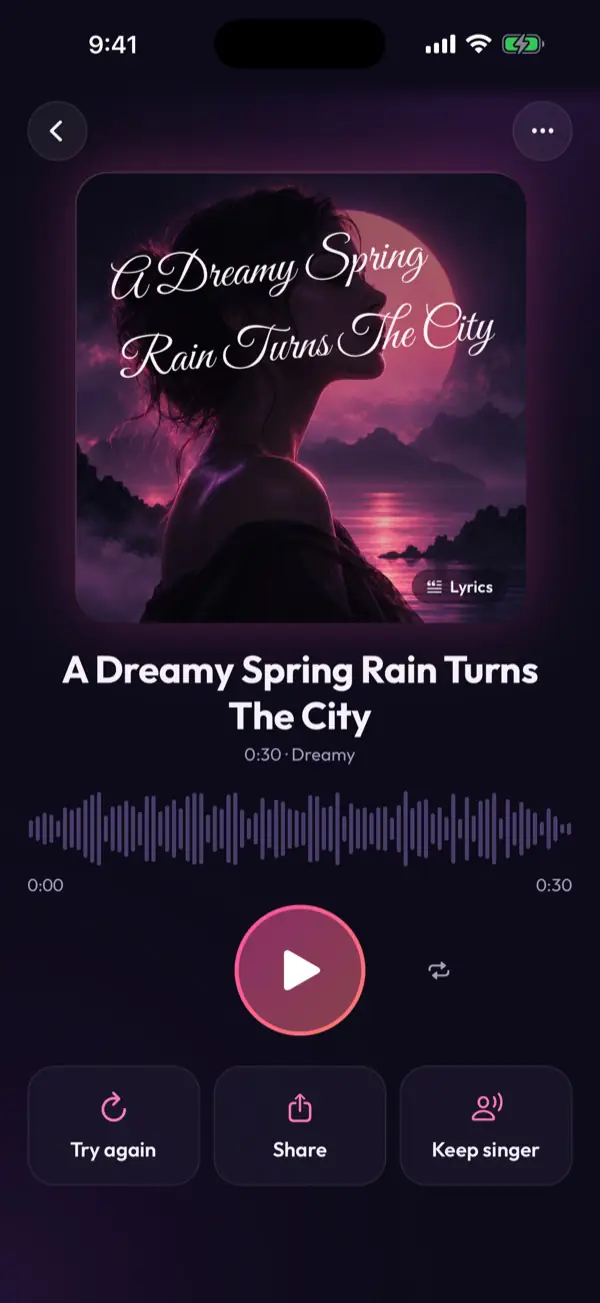
The Moonsong song screen: a cover titled A Dreamy Spring Rain Turns The City, a waveform player, and Try again, Share and Keep singer buttons.
Short song with AI lyrics9 credits
Your balance9 credits

Inside the app

Made for the song in your head.

Every choice is yours, in plain language. Here is what the app can do.

Any language

Sing in your language.

Pick a flag, or just ask for a song in Spanish. Moonsong covers the main language of every country, and lyrics are written in the language you choose.

  • Some languages the music model sings especially well; others may vary, and none are blocked
  • Or let Moonsong follow the language of your idea

Make a song in your languageFirst short song free

The Moonsong lyrics view of a Spanish song, La taza del alba, with a waveform player.

Voices and sounds

Choose the voice, and how it sounds.

Female, male or a group, then the sound: soprano, alto, breathy pop, soul, tenor, baritone, raspy rock, rap, folk, choir or a harmony duo. Or go a cappella, with voices only.

  • Moods from dreamy to triumphant
  • A short song or a full one, priced before you start
The Moonsong Create screen with the idea Warm night drive along the coast, a female voice, the Alto sound and a short song.

Song from a photo

Turn a photo into a song.

Pick a photo and the music follows your picture. It is sent with your request only when you choose one, and it never appears on a share page.

  • Works with your lyrics or just an idea
  • You decide which photo, every time

Try it with your photoOn Google Play

The Moonsong Create screen with Song from a photo turned on, a harbour photo with lanterns selected, no vocals and a short song.

Keep singer

Found a voice you love? Keep it.

Save the singer from a take, and new songs usually sound close to it. Try again gives you a fresh performance, and every take is kept so you can compare.

  • Every take is a new AI performance, not voice cloning
  • Favourite a take and choose the one you keep
The Moonsong song screen with Try again, Share and Singer kept buttons.

Playlists and sharing

Playlists, and a link when you want one.

Build playlists, play and shuffle them, and add new songs made to fit. Share a song or playlist by an unlisted link, with an optional 6-digit passcode, and turn it off any time.

  • Nothing is public unless you share it
  • Listen, download and share on the web too

Start your first playlistFree to download

A Moonsong playlist called Night Drive with Play and Shuffle buttons and three songs.

Lyrics your way

Your lines stay yours.

Write in verse, chorus and bridge blocks, or ask for a draft. AI rewrites arrive as changes you accept or reject, and locked lines reach the music model exactly as written.

  • Rewrite a line, a block or a selection
  • Pronunciation hints for names
The Moonsong lyrics editor with a suggested rewrite and Accept and Discard buttons.

Never used for training

Your lyrics, songs and photos are never used to train AI models: not by us, and not by our AI providers.

The price before the work

Credits are never charged without a price shown first. Every AI action shows its cost and your balance, and failed deliveries are refunded automatically.

Your library on the web

Sign in with the same email to listen, download and share your songs and playlists on any screen. Open the web library

How it works

From the page to a finished song, in six clear steps.

Every step is visible and editable. Nothing is spent until you confirm a price, and your own lines are never silently rewritten.

  1. 1

    Write or draft your lyrics

    Write in section blocks: verse, chorus, bridge. Ask for an AI draft or a revision and accept changes section by section. Lock the lines that must stay exactly as written.

    Chorus · locked
    Stay, stay till the moon comes down…

    Manual writing free · AI draft or revision 1 credit

  2. 2

    Shape the Song Blueprint

    Pick genre, mood, vocal style, instruments, energy and things to leave out. Add pronunciation hints for names. The plan is in plain language, not a hidden prompt.

    Dream PopDreamyFemale vocalPianoSynthDrums

    Editing the blueprint is free

  3. 3

    Choose a full song or a short one

    You see the exact credit cost and your balance before anything runs. Make a full song, or a short one (about a minute) when you want something quick.

    Full song12 credits
    Short song8 credits

    Credits are restored automatically if delivery fails

  4. 4

    Compare takes

    Every generation is a new take. Nothing is overwritten. Listen side by side, add notes, favourite a take and mark the one you keep.

    Take AFull song · first try
    Take BNote: softer introKeeper

    Playback is free

  5. 5

    Make a cover

    Use a free template and place your title, or generate an AI cover once you've chosen your take.

    Cover template: a glowing pink lotus on dark water.Midnight Turns
    • Templates and titles: free
    • AI cover: 4 credits

    Change titles and colours any time for free

  6. 6

    Export and keep it

    Save the audio, cover, lyrics and a Creation Record to your phone or share them. Exporting never costs credits and works without a subscription.

    • Audio (MP3)
    • Cover image
    • Lyrics
    • Creation Record

    Export and re-export are free

Built on trust

A studio that respects your words and your wallet.

Private by default

No public feed, no comments, no followers. Share a song only if you choose, by an unlisted link with an optional passcode, and turn it off anytime.

The price before the work

Every AI action shows its credit cost and your balance first. Manual editing, templates, playback and export are free.

Bought credits never expire

Credit packs stay usable forever, with or without a plan. Plan credits refresh every month and don't roll over.

Your lines stay yours

AI suggestions arrive as changes you accept or reject. Locked lines reach the music model exactly as written.

Honest about results

Each take is a new AI performance. Models may not sing every word perfectly, and the same voice isn't guaranteed. We say so up front.

No ads, no ad trackers

The app shows no ads and has no advertising or analytics SDKs, no advertising ids, and no contacts or location access. If you install from one of our own ads, the app notes which ad it was (from the Play Store link) so we know which ads work. The microphone is used only while you choose Listen or Hum, and a photo only when you pick one for Song from a photo. Sign-in is by email code or link. No passwords.

Pricing

Start free. Pay for what you make.

One credit wallet covers songs, covers and lyric help. Prices below are US references for the Android app; Google Play shows the exact price for your country before you buy.

Free introduction

$0

  • One free short song
  • One AI lyric draft
  • Free cover templates

Given once to each verified account as 9 promotional credits.

Studio

$9.99 / week

  • 240 credits every week
  • For example, twenty full songs
  • Credits refresh weekly, no rollover

Or $299.99 / year, with 1,080 credits added each month.

50 credits$4.99
120 credits$9.99
300 credits$19.99

Full song 12 credits · short song 8 · AI lyric draft 1 · AI cover 4 · 10 AI edits 1. Full pricing details

AI disclosure

Moonsong is made with AI, and says so.

Music is made with Google's music AI, lyric drafts and revisions with OpenAI, covers with Black Forest Labs, and text safety checks with Typesafe.

Nothing is sent to an AI provider until you give permission in the app. Songs and covers are labelled as AI-generated, and every export can include a Creation Record.

How AI is used and what it means for rights

Your rights, plainly

Use lyrics you wrote or are allowed to use.

Moonsong is for original work. Don't submit lyrics you don't have permission to use, and don't ask Moonsong to imitate a real artist's voice. “Song like…” uses general style traits such as genre, tempo and instrumentation, never copied melodies, lyrics or voices.

We can't promise copyright protection, distribution approval or Content ID acceptance for AI-generated music, and a Creation Record is a record of your workflow, not a copyright certificate.

Terms of Use · Privacy Notice

Bring the words you've been carrying.

Moonsong is on Google Play now, and coming to iPhone. Questions and feedback are welcome at support@sansavision.com.

AndroidGet it on Google Play
iPhoneComing soon to the App Store

Artwork on this page comes from Moonsong's built-in cover templates. The songs you can play on this page are real takes made in Moonsong, and like every Moonsong song they are AI-generated.